



Student VISA

What is DS-160 Form: Fees, Validity, Requirements & How to Fill It

Author_Image
Ruchi Khanted
6 mins
36.8k views
Summarise with AI

The DS-160 form is the official application form required by the U.S. Department of State and is mandatory to submit if you are applying for a non-immigrant U.S. visa. US Consular Officers use the information entered on your DS-160 to process your visa application and determine your eligibility for the US visa.

This guide explains everything you need to know about the DS-160 form, including required documents, step-by-step instructions, photo specifications, fees, and more.

star icon
Key Highlights

What is the DS-160 Form?

The DS-160 (Online Nonimmigrant Visa Application) is an electronic form that the US Department of State uses to collect information for all non-immigrant visa categories, like (B-1/B2, F-1, M-1). The form covers nine broad sections, ranging from basic personal details to social media handles from the past five years.

Who Needs to Fill the DS-160 Application?

If you are applying for a U.S. non-immigrant visa, you must complete the DS-160 application before your visa interview. This applies to all applicants, including infants and children. Use form DS-260 if you are applying for an immigrant visa (green card).

Here are all non-immigrant US visa categories that require the DS-160 form.

  • B-1/B-2 Visa: For business travellers, tourists, family visitors, and medical travellers.
  • F-1 / M-1 Visa: For academic (F-1) and vocational (M-1) students.
  • J-1 Visa: For exchange programme participants, including scholars, interns, and au pairs.
  • H-1B Visa: For professionals working in specialised occupations.
  • L-1 Visa: For employees transferring within the same company.
  • O / P Visa: For individuals with extraordinary ability and internationally recognised athletes or entertainers.
  • C / D Visa: For transit travellers and airline or ship crew members.
  • I Visa: For journalists and foreign media professionals.

Documents Required for the DS-160 Form

You don’t have to submit any documents to fill the DS-160. However, keep these documents ready to reference specific information and avoid session timeouts while filling the form.

  1. Valid passport: You need your passport number, issue date, expiry date, and issuing authority exactly as they appear in the passport.
  2. I-20 form: Your university will issue an I-20 form once you accept admission. You need the SEVIS ID number and your school code.
  3. Current and past education history: Names of schools/colleges attended, degrees earned, graduation dates, and the city and country of each institution.
  4. Resume or CV: If you have work experience (including part-time or internships), you need the employer name, address, job title, and dates.
  5. Travel history: Countries you have visited in the past five years, along with approximate dates.
  6. Previous US visa details: If you have held a US visa before, keep the visa number and issue date ready.
  7. Social media accounts: Usernames/handles for all social media platforms you have used in the past five years, including inactive accounts.
  8. Personal/Family Information: Birth dates and full names for both your parents.
  9. Digital Photograph: A recent passport-style photo that meets standard U.S. visa photo specifications.
  10. Travel itinerary (for tourist visa): Your intended US arrival date, the length of your planned stay, and the address where you will stay in the US (hotel name and address, or a host's full address).
  11. Proof of funds: You do not upload documents, but the form asks who is funding the trip and the approximate amount available.
Explore Destinations
Explore All Guides

How to Fill the DS-160 Form: Step-by-Step

You can fill the DS-160 form online through the official U.S. Department of State CEAC Portal. Follow these steps to fill out your DS-160 form:

  • Step 1: Start a new application: Go to the CEAC Portal and select the US visa application centre where you will attend your student visa interview. Click Start an Application and note down the Application ID at the top right-hand corner of the page. You will need this to retrieve your form if the system times out (within 20 minutes)
  • Step 2: Enter your details: Follow the on-screen instructions to fill the form. You’ll be asked about your personal details, travel plans, passport information, family background, work history, and more.
  • Step 3: Digitally sign the form: Review the details and digitally sign the application with your passport number and a security question. Once submitted, you cannot edit the form, so make sure all details are entered correctly.
  • Step 4: Print the confirmation page: After submission, a confirmation page with a barcode will appear. Print this page as it’s required for scheduling your visa interview and must be brought with you to the U.S. Embassy or Consulate. You do not need to print the full application.

DS-160 Form: Photo Requirements

To fill out your DS-160 form, you need a high-resolution, colour photo taken in the last 6 months against a plain white background. Here are the exact photo requirements:

  • Size: 2 x 2 inches (51 x 51 mm) scanned at a resolution of 300 pixels per inch.
  • Digital dimensions: Minimum 600 x 600 pixels, maximum 1,200 x 1,200 pixels. The image must be perfectly square.
  • File format: JPEG only under 240kB. The compression ratio should be at least 20:1.
  • Background: Plain white only. No grey, blue, patterned, or textured backgrounds.
  • Expression: Neutral expression, mouth closed. A very slight natural smile is acceptable, but no teeth-showing smile or exaggerated expression.
  • Eyewear: Glasses, including prescription ones, are not permitted. 
  • Head coverings: Not allowed, unless worn for religious purposes. If worn for religious reasons, your full face including ears must remain clearly visible.
  • Clothing: Wear regular clothes and avoid uniforms or camouflage prints.
  • Face positioning: Your face must take up 50–69% of the total image height. Eyes must be open, looking directly at the camera.

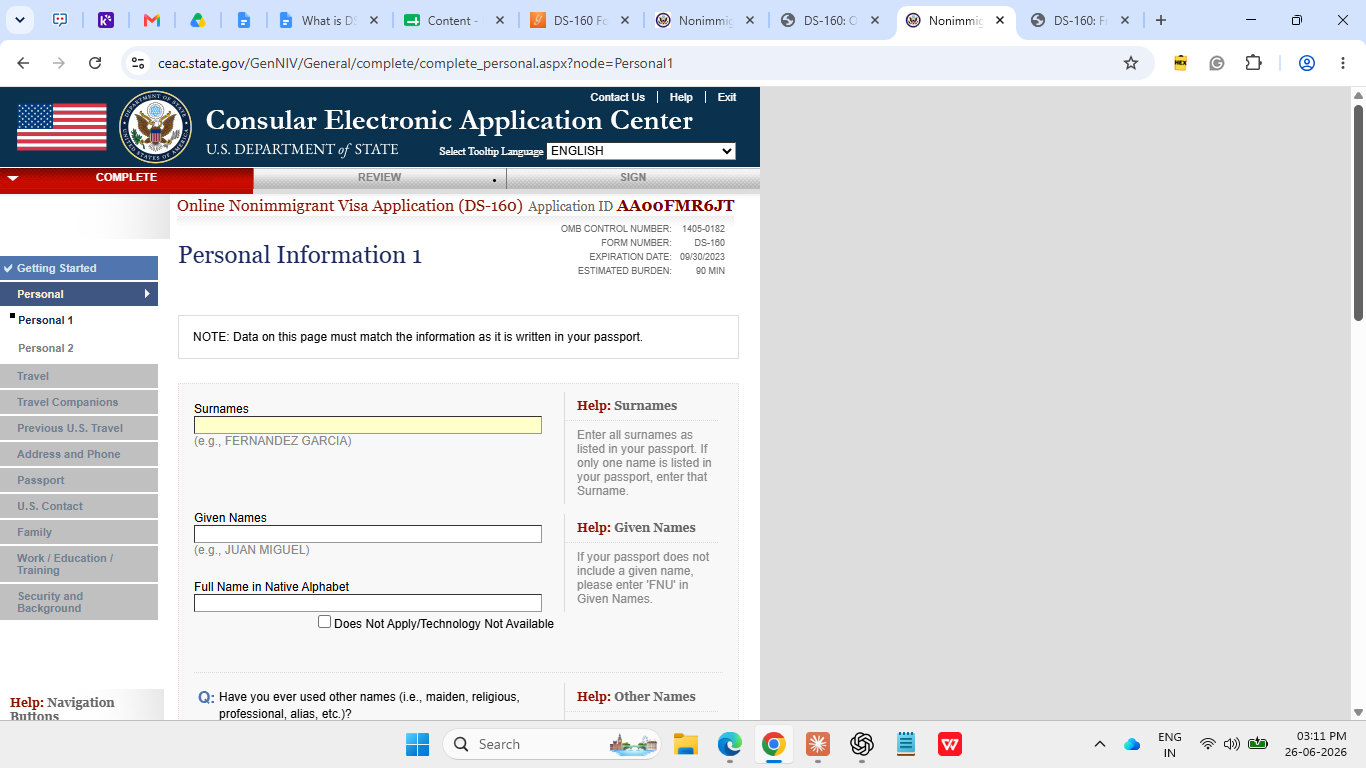
Sample DS-160 Form

Here’s how the official DS-160 form looks. 

How to Edit the DS-160 After Submission?

You cannot edit the DS-160 form directly after submission. If you entered the wrong information, you must complete a new DS-160 form. Follow these steps if you need to correct your DS-160 after submission:

  • Step 1: Start a new application: Go to the CEAC Portal again and click on "Start an Application" to generate a new Application ID. 
  • Step 2: Fill in the corrected information: Complete the entire form again with the accurate details and sign it digitally. 
  • Step 3: Print confirmation page: Print the new confirmation page and carry it to the consulate for your visa interview.

DS-160 Validity

There is no official expiry date on a submitted DS-160 form. After submission, you can log back into CEAC using your Application ID for up to 30 days to reprint the confirmation page if you lose it. 

Once you start filling out the DS-160 on the CEAC portal, you have 30 days to complete and submit it. If you do not submit within 30 days of starting, the system automatically deletes all saved progress, and you must begin again from scratch. 

DS-160 Form Fees

The DS-160 form itself has no filing fee. However, you must pay a separate Machine Readable Visa (MRV) application fee before you can schedule your consulate interview appointment. This fee is non-refundable regardless of whether your visa is approved or denied, and it is non-transferable between applicants.

The current MRV fees as of 2026 are:

Visa Category

MRV Fee 

B-1/B-2/F-1,M-1

$185 (₹17,500)

H-1B, L-1, O, P, Q, R

$205 (₹19,300)

K-1 

$265 (₹25,000)

E-1/E-2/E-3 

$315 (₹29,500)

Common DS-160 Form Mistakes & How to Avoid them

Here are common mistakes to avoid while filling out the DS-160 form.

  • Name mismatch with passport: Enter your name exactly as it appears in your passport, including the spelling, hyphens, middle names, and exact spelling. 
  • Concealing prior visa refusals: The consular officer already has access to your prior application history. Answering "No" when the answer is "Yes" is a misrepresentation that results in permanent inadmissibility under US immigration law.
  • Selecting the wrong purpose of travel: Choosing "Tourism/Visit" when you are applying for a USA student visa or any mismatch between your stated purpose and the visa category raises immediate red flags.
  • Uploading a non-compliant photo: HEIC files, photos larger than 240 KB, blurry images, or photos with a non-white background all cause instant upload rejection.
  • Omitting social media accounts: The DS-160 requires you to list all social media handles from the past five years, including platforms you no longer actively use. Omitting accounts, even deleted ones, that consular officers later find is treated as misrepresentation.
  • Non-English Input: You must complete the DS-160 form strictly in English using English characters only. Using characters from your native language will cause automatic rejection.
  • Not printing the barcode confirmation page: After submitting, the only proof that you completed the DS-160 is the confirmation barcode page. Without it, the consulate cannot locate your application at the interview. Print it immediately after submission and make a backup copy.
  • Leaving Blank Fields: Fill all fields unless marked optional or write "Does Not Apply" if necessary.

From the Desk of Yocket

A single error in a key field of the DS-160 form can mean starting the entire process over or, worse, a visa refusal that follows your record permanently. So follow the instructions carefully and review information against official documents before submission.

With Yocket Premium, you get guidance from counsellors who have helped thousands of Indian students navigate the US visa process. So you can confidently navigate your study abroad journey from university shortlisting to visa application.

Frequently Asked Questions About DS-160 Form

Is the DS-160 form free of cost?

Can I fill out the DS-160 for a family member?

How long does the DS-160 form take to complete?

Can I use the same DS-160 form for a future visa application?

Do I need to complete the DS-160 before scheduling my visa interview?

Is the DS-160 form the same as the US visa application?

More Topics

Check your Eligibility at 2000+ Universities

Articles you might like

Check your Eligibility at 2000+ Universities