Student VISA

How to Fill DS-160 Form for F-1 USA Visa: Step-by-Step Guide

Author_Image
Yocket Editorial Team
6 mins
200.2k views
Summarise with AI

The DS-160 form is the official online application required for all US non-immigrant visas, including the F1 student visa. It is used by the US Department of State to collect your personal, academic, travel, and financial details before your visa interview.

The form is filled and submitted online through the Consular Electronic Application Center. After submission, you receive a confirmation page with a barcode, which is required to book your visa appointment.

This guide covers how to fill the DS-160 form step by step, documents required, and common mistakes to avoid.

What is the DS-160 Form?

The DS-160 is an online application form that every F-1 student visa applicant must fill out before scheduling a US visa interview. It collects your key personal, academic, and travel details and connects directly to your US visa application.

The DS-160 acts as the official record of your intent to travel to the United States for temporary, non-immigrant purposes, like study. It connects directly with your SEVIS record, which tracks international students in the US, and becomes part of your visa profile throughout your journey. Filling it correctly is not just a formality; it’s the first official step in your student visa process.

How to Fill DS-160 Form for F1 Visa?

Here is the step-by-step process to fill out the DS-160 form for US student visa:

  • Step 1: Visit the Consular Electronic Application Center website
  • Step 2: Log in to your Account
  • Step 3: Fill in the Security Question
  • Step 4: Fill in Your Personal Information
  • Step 5: Answer the Security Questions 
  • Step 6: Fill in F-1 Visa Specifics
  • Step 7: Review & Submit Your DS-160 Form

Let us explain each in detail now:

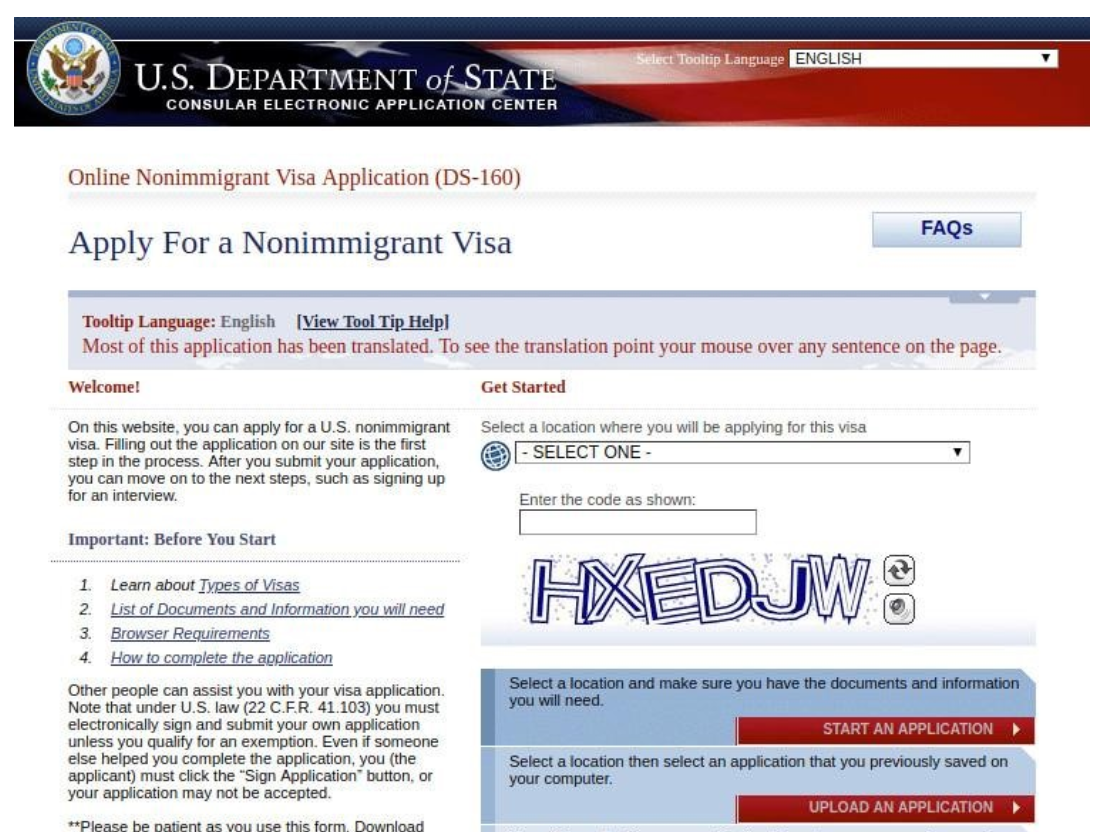
Step 1: Visit the Consular Electronic Application Center Website

Visit the Consular Electronic Application Center website to start your DS-160 form application.

Step 2: Log in to your Account

Once you’re on the sign-in page, enter your preferred consulate and the CAPTCHA code. Select ‘Start an application’ to start your new application, or select ‘Retrieve an application’ if you already have your application number.

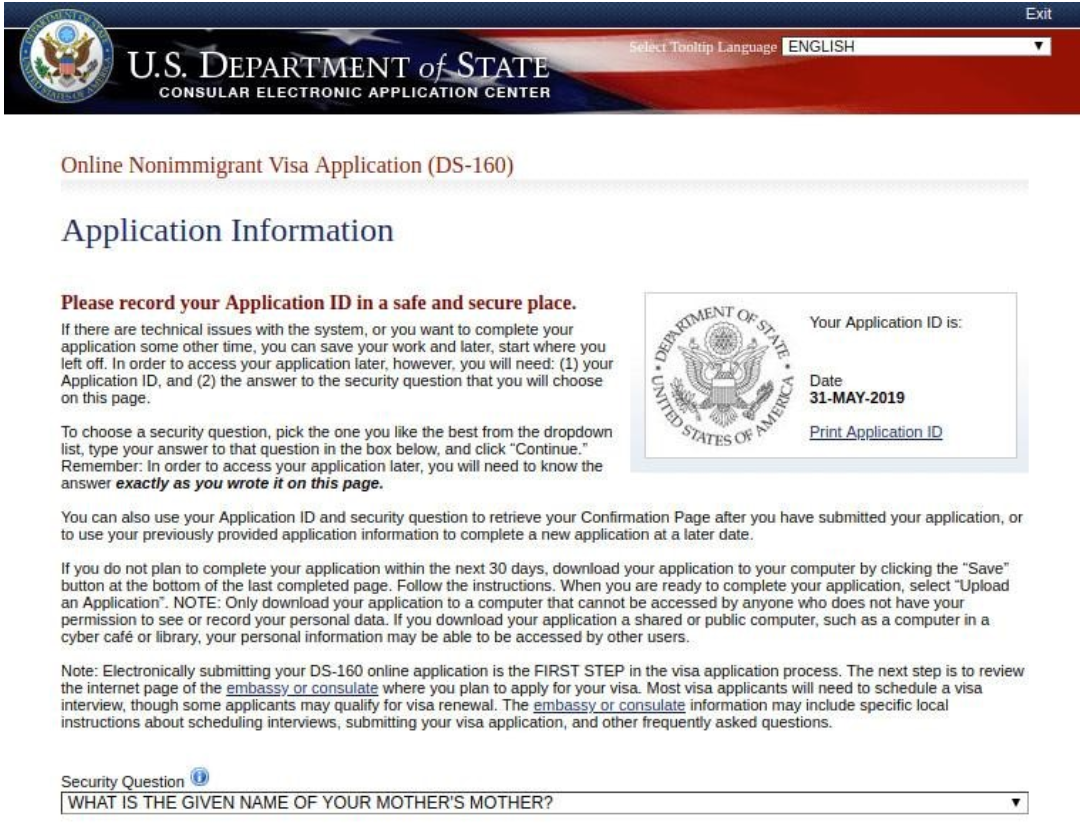
Step 3: Fill in the Security Question

The security question is the same for everyone, i.e. the name of your mother’s mother, which has been shown in the DS-160 form sample below.

Step 4: Fill in Your Personal Information

The next two pages require you to enter your personal information. This includes your full name, name in the native alphabet, and information about any previous names you might have had. Check ‘No’ where they ask you if a Telecode represents your name. On page 2, you will be asked about your nationality and whether or not you hold the nationality of another country. Do fill in the necessary details according to your profile, like:

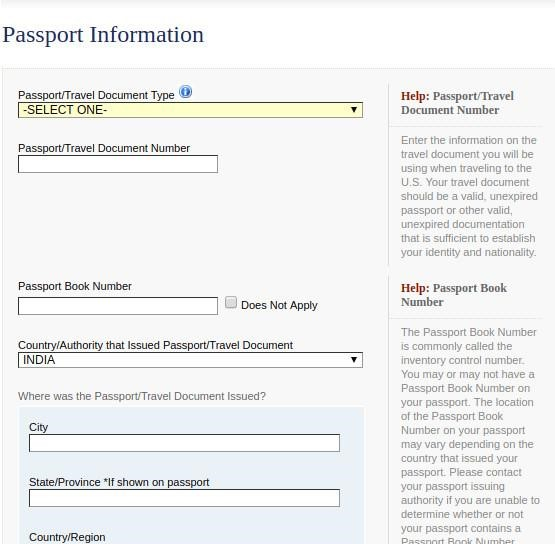
Fill in the Passport Details 

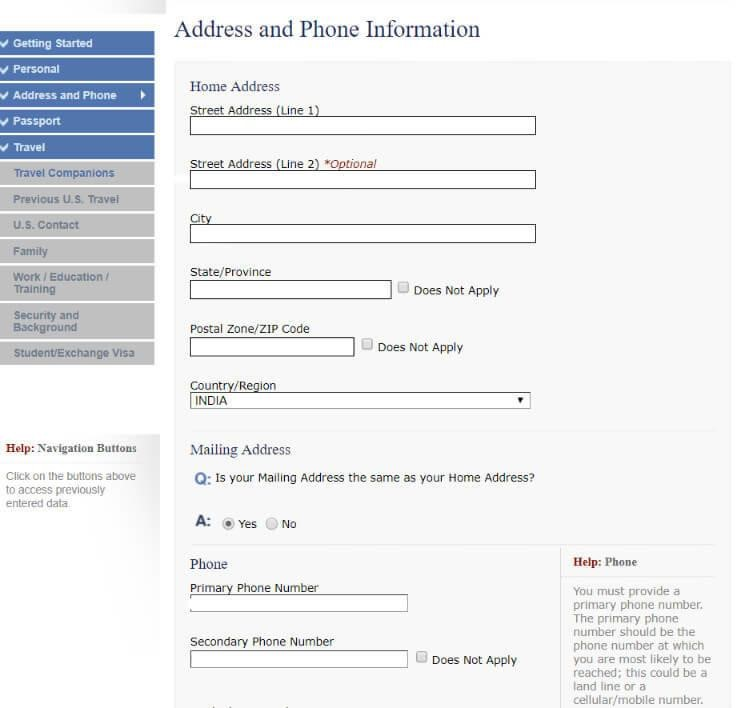
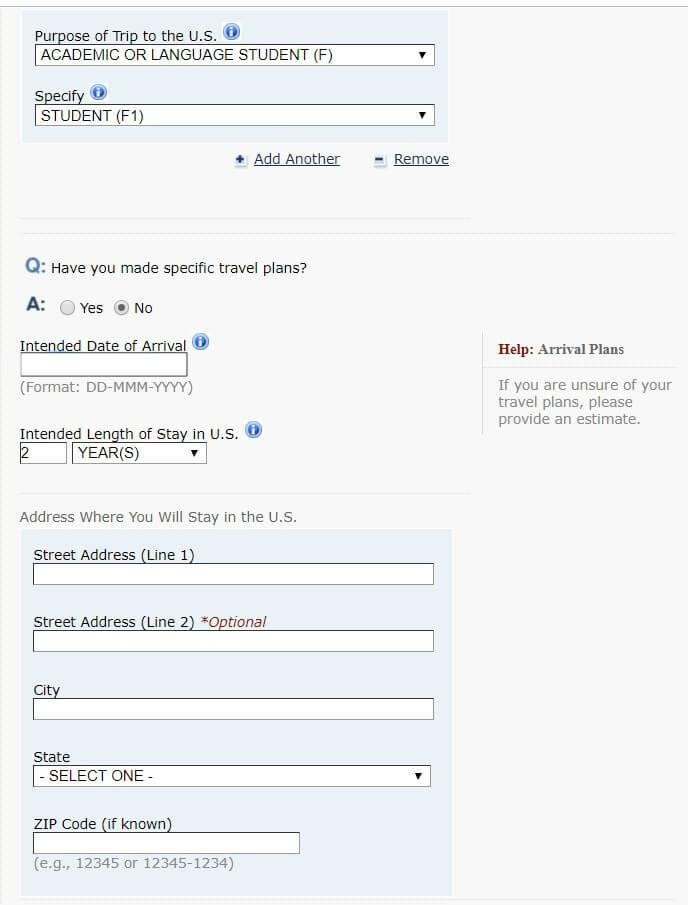
The next two sections are about your address, phone numbers, travel information, passport information, etc.

Some important points to note while DS-160 fill are:

  • The type of passport is Regular unless you come into any of the other categories.
  • The type of visa is generally a student F-1 visa.

  • If you have booked your flight tickets, then you can mention it while filling out the DS-160 form. If not, you need to enter the intended date of entry to the US. This could be 5-7 days before your orientation.
  • The address where you will stay is the University’s address mentioned on the I-20.
  • If you’re paying for the trip, then mention Self, else mention your sponsor's name, contact details, and relation to you.

  • You can mention whether or not you’re travelling with anyone who isn’t a student, like your parents.


  • Describe any previous US travels.


  • Your US Point of Contact is mentioned on your I-20. They are a school official, generally from the office of international admissions or such. Their address is the college address mentioned on your I-20, and their email address and phone number can be found on the website.

  • Fill in Your Family Information

The next section of the DS-160 form is very generic and requires you to fill in your basic family information.

  • Fill in Your Education Details 

In the next section, you need to mention your post-secondary education (undergraduate degree, graduate degree, etc.) You also need to mention your current and previous employment details. People who are not employed, as well as not studying, can select 'NOT EMPLOYED' in the Primary Occupation section.

You will also be asked questions about the languages you can speak, places you have travelled to (abroad) in the past 5 years.

This is followed by a few questions about you, such as whether you have any special skills in the field of explosives, if you’ve ever served in the military, if you’ve been a part of a rebel group, etc. The answer to all these questions should be NO, unless it’s valid for you and you have a valid explanation for it.

SuggestedWhat is the Difference between J1 and F1 Student Visa? 

Step 5: Answer the Security Questions 

The next section of the DS-160 form contains security questions. These are to ensure that you are not going to cause any trouble in terms of violence, communicable diseases, etc., while in the US. It is a 5-part section.

They may even ask you questions like whether you have any communicable diseases, any disorders, drug addiction, whether you or any member of your family has been involved in criminal activities, etc.

The US consulate also asks you whether you have ever tried to gain immigrant status in the US by unlawful means. The answer to all these questions should be NO; otherwise, you raise red flags with the visa officer!

Step 6: Fill in F-1 Visa Specifics 

The next section is specific to the F-1 visa. It contains fields to enter your SEVIS ID, school name, and address, course information, duration, etc. This is specific to student visas.

Step 7: Review & Submit Your DS-160 Form 

After knowing how to fill out DS-160, and filling it out, you need to review your application carefully. You don't have to upload any photographs as the photograph will be taken at the ASC (Application Service Centre).

Now that you are aware of how to fill out DS-160, you will go about it the same way. Make sure that you check your information thoroughly, as you cannot make changes once you submit. Once submitted, you will receive the confirmation. After which, you can proceed to book the US visa interview dates on the embassy or consulate website.

Sample DS-160 Form for F1 Visa

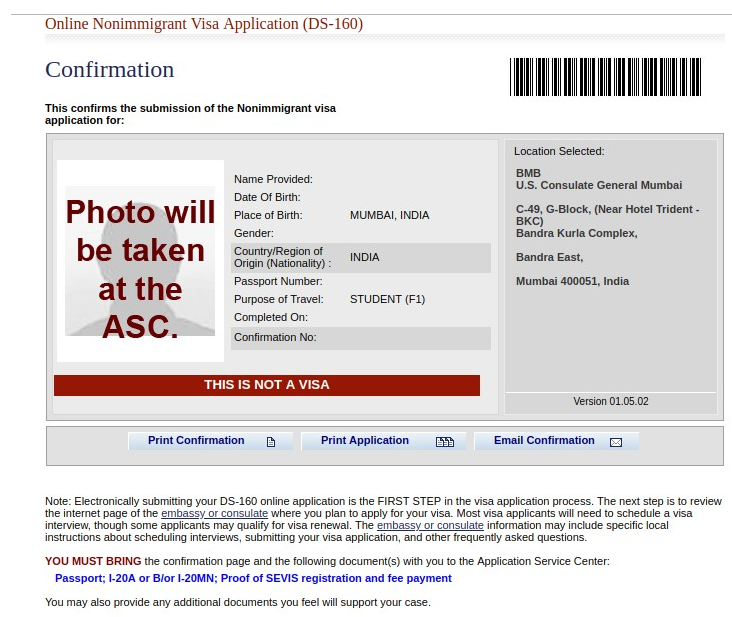
Here is a sample of the DS-160 confirmation page to help you understand what it looks like. This page confirms that you have successfully submitted your US non-immigrant visa application and is required at the time of your visa appointment.

Explore Destinations
Explore All Guides

Mistakes to Avoid When Filling DS-160 Form

You must fill out the DS-160 form correctly to avoid delays or visa rejection. Even small mistakes like wrong dates or missing details can cause serious problems. Below are common mistakes you should avoid when filing the DS-160 form:

  • Use the Same Information Everywhere: Make sure your name, date of birth, and other details match across all documents, passport, I-20, financial proof, and DS-160 form. Even one spelling change can cause problems.
  • Be Careful with Travel Details: Write the right travel date (based on your I-20 start date). For your U.S. address, use your university’s address if you haven’t booked housing yet.
  • Choose the Correct Visa Type: If you're a full-time student, select F-1 as your visa type. Don’t pick a tourist (B-2) or an exchange visitor (J-1) by mistake.
  • Double-Check Passport Information: Your passport number, issue date, and expiry date must be 100% correct. A small typing mistake can cause issues during your interview.
  • Answer Security Questions Seriously: Give honest and clear answers in the security and background section. Don’t make jokes or guess. Treat this very part seriously.
  • Save Your Application ID: When you start the form, you get an Application ID. Save it in your phone or email. You’ll need it if the session times out.
  • Upload the Right Photo: Your photo must be in colour, recent, and taken with a white background. It should be 2x2 inches in size. If it doesn’t follow these rules, the system may reject it.
  • Review Before You Submit: Once you submit the form, you cannot edit it. Read every section carefully before clicking ‘submit’.
  • Don’t forget the Confirmation Page: After submitting, you’ll get a confirmation page with a barcode. Print it and bring it to your visa interview. You won’t be allowed in without it.

From the Desk of Yocket

The process of filling out DS-160 is easy, provided you have all the relevant information. We would suggest you only fill in honest information, which creates no hassle in your US student visa application process. 

If you are ambitious to start your study abroad journey, you are in the right place! With Yocket Premium, you not only get your profile built by our top-of-the-field counselors, but you also get guidance for making a strong application that will get you the admission you are looking for.

Frequently Asked Questions on How to Fill DS-160 Form 

When to fill DS-160 form? 

How to fill DS-160 without surname in passport? 

How do I get a PDF of DS 160?

How much is the DS-160 fee for an F-1 visa?

Can I fill out the DS-160 form without paying the SEVIS fee?

More Topics

Articles you might like

Check your Eligibility at 2000+ Universities